
One of the most requested features in urban water distribution network simulation software is the determination of which valves must be closed to isolate a network segment around a failure point, or where works are to be carried out to extend service. This is also known as identifying the isolation polygon or “shut‑off area”.
These operations involve isolation or shut‑off valves, which are essentially on/off valves. Since these valves are numerous, they are often not modeled. In QGISRed, however, they are considered as complementary elements that do not split the pipe and therefore do not form part of the calculation model, but they do have the ability to act on the network by modifying the state of the pipe where they are located.
One of the main reasons for introducing these valves in QGISRed was precisely to accurately identify isolation polygons and the customers who would be left without service during maintenance operations.
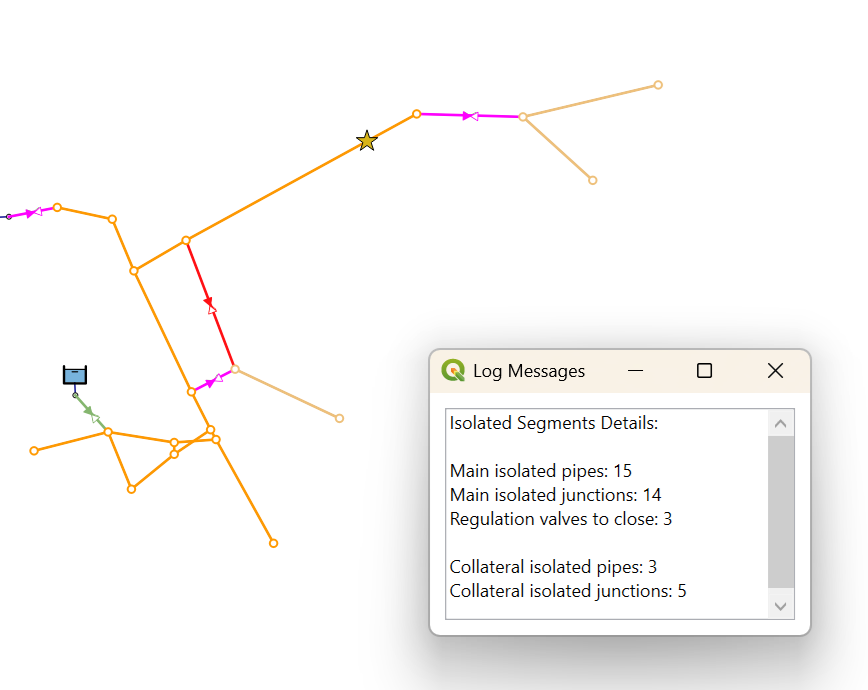
The new version 0.17 of QGISRed already allows declaring a failure or intervention at a point in the network and then exploring its surroundings to determine which shut‑off valves must be closed to isolate the affected area. The exploration takes into account both shut‑off valves and regulation valves included in the model, differentiating valves that were already closed for any reason from those that must be operated. If one of these valves is disabled, the exploration continues until other operational valves are found. In addition, if as a consequence of the shut‑off another adjacent area would lose supply and there is an option to feed it by opening a nearby valve, this is also reported.
Finally, the map highlights the pipe sections that would be taken out of service as a result of the shut‑off, up to the position of the closed valves, as well as the corresponding service connections if they have been previously digitized.
This new capability admits many additional options that will be progressively completed in future versions of QGISRed. A future tutorial will show the full potential of this very useful and practical tool. Although there is room for improvement, the current features are already sufficient for many practical modeling applications.