 QGISRed
9.3 Model Export
The Analysis bar offers two export paths: the full model as an EPANET .inp file, and the simulation results as CSV tables.
Export model to INP…#
Analysis bar → Export model to INP…
Exports the entire model to the standard EPANET INP format. Useful for sharing the model with other users, running it in the EPANET graphical interface or integrating it with third-party tools.
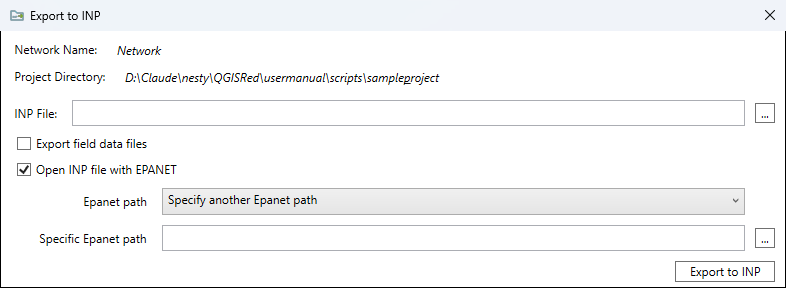
Export dialog to INP format
Dialog Options#
| Option | Description |
|---|---|
| INP file | Full path of the .inp file to be generated. Use the … button to navigate. |
| Export field data files | Also exports the auxiliary field data files associated with the model. |
| Open INP file with EPANET | If active, opens the .inp in EPANET upon completion of the export. |
| Epanet path | EPANET executable detected on the system. The dropdown shows all installed versions. |
| Specific Epanet path | Manual path to an EPANET executable not automatically detected. |
Press Export to INP to generate the file with the chosen configuration.
Export results to CSV…#
Analysis bar → Export results to CSV…
Exports the results of the last simulation to two CSV files: one for nodes and one for pipes. It is the standard method for getting results into Excel, Python, R, or other external analysis tools.
Only available if a simulation file
.outexists for the active scenario.
Dialog Options#
| Option | Description |
|---|---|
| CSV nodes | Output file path for node results. By default {Red}_{Escenario}_Nodes.csv in folder Results/. |
| CSV Links | Output file path for pipeline results. By default {Red}_{Escenario}_Links.csv. |
| List separator | Field separator (automatically detected from the regional system; common ; in European premises). |
| Decimal separator | Decimal separator (detected from the system; common , in European locations). |
File contents#
CSV Nodes — one row per time instant per node, with columns:
Time | ID | Pressure | Head | Demand | Quality
CSV Links — one row per time instant per pipe/valve/pump, with columns:
Time | ID | Status | Flow | Velocity | HeadLoss | UnitHdLoss | FricFactor | ReactRate | Quality
The separators adapt to the locale of the operating system so that the file opens correctly in Excel without the need for conversion.