 QGISRed
5.6 Controls and Rules
Edition bar → Edit controls…
The controls editor defines the operating logic of the network: when a valve opens, when a pump starts, or what sequence of actions triggers a certain system state. EPANET supports two levels of control with different complexity.
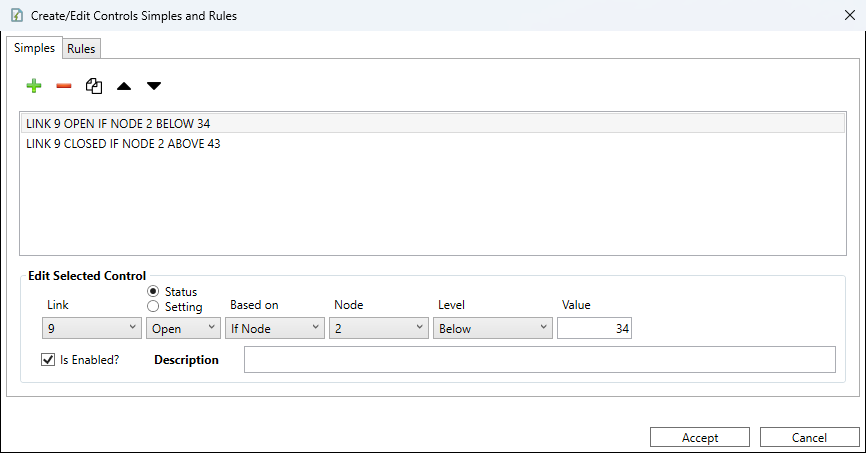
QGISRed Rules and Controls Editor
Simple Controls#
A simple control defines a single action that is executed when a single condition is met. They are sufficient for most basic automations.
Structure#
IF [elemento] [condición] THEN [acción]
Condition Types#
| Type | Usage example |
|---|---|
| Tank level | If the level of Tank T-1 exceeds 4.5 m → close pump BM-1 |
| Node pressure | If the pressure in J-120 drops below 10 m → open valve V-3 |
| Simulation time | At 6 hours of simulation → turn on pump BM-2 |
| Clock | At 23:00 (clock time) → close pipe P-55 |
Available actions#
| Action | Applies to |
|---|---|
| OPEN | Pipes, valves, pumps |
| CLOSED | Pipes, valves, pumps |
| Setting = value | Valves (changes the regulation setpoint) |
| Speed = value | Pumps (changes relative speed) |
Complete example#
; Start pump when tank is low
IF TANK T-DEPOSITO1 LEVEL BELOW 1.5
THEN PUMP BM-ELEVADORA OPEN

; Stop pump when tank is full
IF TANK T-DEPOSITO1 LEVEL ABOVE 4.0
THEN PUMP BM-ELEVADORA CLOSED

; Turn on booster pump during peak hour
IF CLOCKTIME 7:00 AM
THEN PUMP BM-REFUERZO OPEN

IF CLOCKTIME 10:00 AM
THEN PUMP BM-REFUERZO CLOSED
Operating rules#
The rules allow you to combine multiple conditions with logical operators, as well as define alternative actions and priorities. They are equivalent to the [RULES] of the EPANET file .inp.
General structure#
RULE [ID]
IF   [condición 1]
AND  [condición 2]          (opcional)
OR   [condición alternativa] (opcional)
THEN [acción principal]
ELSE [acción alternativa]   (opcional)
PRIORITY [número]           (opcional)
Logical operators#
| Operator | Usage |
|---|---|
| AND | All conditions must be met simultaneously |
| OR | It is enough that any of the conditions is met |
PRIORITY#
When two rules with conflicting conditions are activated at the same time, the one with the higher priority number wins. The default value is 0.
Complete example#
RULE R-01
IF   TANK T-DEP1 LEVEL BELOW 2.0
AND  PUMP BM-ELEV STATUS = CLOSED
THEN PUMP BM-ELEV OPEN
PRIORITY 2

RULE R-02
IF   NODE J-SALIDARED PRESSURE BELOW 8.0
OR   TANK T-DEP1 LEVEL BELOW 1.0
THEN PUMP BM-REFUERZO OPEN
ELSE PUMP BM-REFUERZO CLOSED
PRIORITY 1
Editing in QGISRed#
The QGISRed dialog presents the rules in directly editable text format, equivalent to the [CONTROLS] and [RULES] section of the .inp file. You can:
- Write controls and rules directly in the text area.
- Activate or deactivate a rule by putting a
;at the beginning (converts the line into a comment). - Check syntax with the validation button before saving.
The controls are exported exactly as they appear when generating the
.inpfrom the Tools bar. If the syntax is incorrect, EPANET will reject the file in simulation.
Modeling Tips#
- For a system with a pump and tank, always define two controls per pump: one to start (low level) and one to stop (high level). Without the stop control, the pump runs indefinitely.
- Simple controls are processed before rules at each time step. If you have a simple control and a rule that act on the same element, the result can be contradictory.
- The order of simple controls does not matter; neither does that of the rules, because priority orders them. But if two rules have the same priority and contradictory conditions, the result is indeterminate.
- Avoid creating control loops (rule A activates B, rule B deactivates A in the same time step): EPANET may not converge.