 QGISRed
6.3 Hydraulic Sectors
Debug bar → Check hydraulic sectors
The hydraulic sectors tool scans the network using a BFS (breadth-first search) algorithm from all supply sources and classifies each connected subnetwork according to whether or not it has a hydraulic source (H) and whether or not it has demand (Q). The result is dumped into SHP layers and into a CSV report.
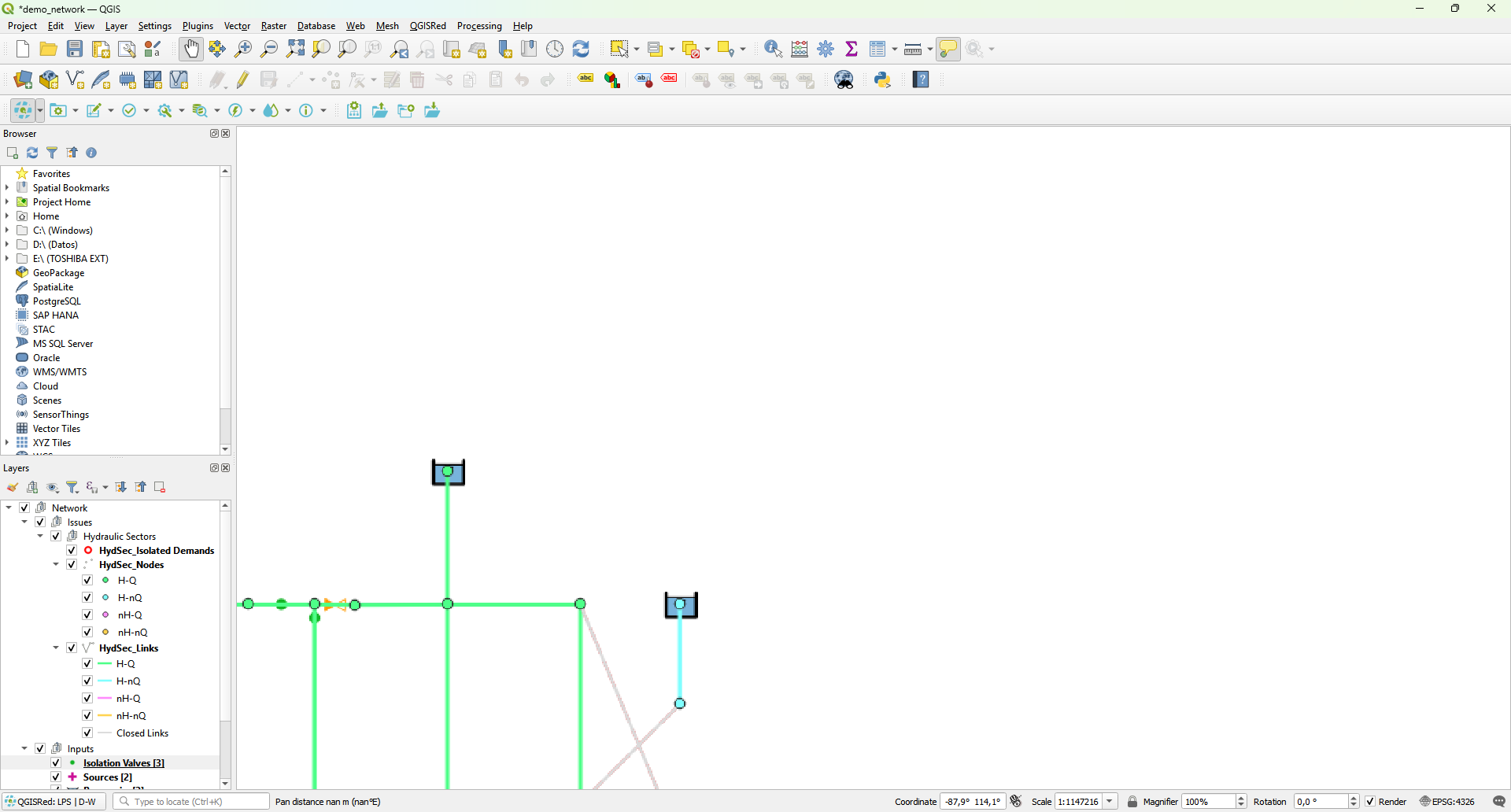
Map of hydraulic sectors: areas colored by type H-Q, H-nQ, nH-Q and nH-nQ
Sector classification#
The tool assigns each sector one of these four types. These are the actual tags that appear in the SHP layer and in the CSV report:
| Tag | Source (H) | Demand (Q) | Meaning |
|---|---|---|---|
| H-Q | ✅ Yes | ✅ Yes | Functional sector: has a supply source and nodes with demand. It can be simulated correctly. |
| H-nQ | ✅ Yes | ❌ No | Latent sector: has a source but no nodes with demand > 0. It can be simulated but without real flow. |
| nH-Q | ❌ No | ✅ Yes | Critical sector: nodes with demand but without any connected source. EPANET will not converge. |
| nH-nQ | ❌ No | ❌ No | Passive sector: neither source nor demand. It does not cause an error in the simulation but it is disconnected. |
H = presence of at least one Tank or Reservoir in the sector. Q = presence of at least one Junction with base demand > 0. n = negation (absence of that condition).
There is also a special pseudo-sector called ClosedLinks that groups pipes with status Closed that are outside any connected sector. It does not count in the total number of sectors in the report.
Outputs generated#
The tool produces three outputs that are automatically added to the project:
| Output | Type | Content |
|---|---|---|
HydraulicSectors |
SHP layer | Geometry of all elements colored by sector type |
HydraulicSectors_IsolatedDemands |
SHP layer | Nodes and connections of the nH-Q type with their isolated demand |
{Red}_HydraulicSectors_Report.csv |
CSV | Table with sector ID, number of elements and classification |
The CSV has the format:
SectorID; NumElements; Classification
S1; 1 243; H-Q
S2; 47; H-nQ
S3; 12; nH-Q
S4; 3; nH-nQ
How to interpret each type#
H-Q — Functional#
Correct status. Every sector that is going to be simulated must be H-Q. A properly constructed network will have a single large H-Q sector (or several if there is actual hydraulic sectoring with closed valves between them).
H-nQ — Latent#
There is a connected source but all nodes in that sector have demand = 0. Common causes:
- Imported network zone with no demand data assigned yet.
- Bypass or reserve branch without consumers (may be correct by design).
In the first case, demands must be assigned before the simulation is realistic.
nH-Q — Critical (the most important to correct)#
It is the only type that prevents simulation. There are nodes with demand that do not have any path to a Tank or Reservoir.
Frequent causes:
- There is a missing pipe that should link this sector with the main network.
- There is a closed valve between this sector and the source (operationally correct, but it must be modeled this way on purpose).
- Topological error: The connecting pipe exists visually but there is a connectivity break — detected with Check connectivity.
The HydraulicSectors_IsolatedDemands layer shows exactly which nodes and connections have demand without a source, making it easier to locate the problem.
nH-nQ — Passive#
Disconnected fragments without consumption. They are usually imported remains or incomplete project branches. They do not cause simulation error, but they dirty the model. If they are not part of the layout, delete them with Delete elements or the Delete isolated subzones option of Check connectivity.
Recommended Workflow#
Before simulating for the first time, or after importing a new network:
- Check && commit data — ensures that the basic topology and attributes are consistent.
- Remove overlapping elements — eliminates nodes and duplicate pipes that could generate artificial sectors.
- Check connectivity — identifies isolated zones visually and, if there is topological "junk", uses Delete isolated subzones.
- Check hydraulic sectors — get the full ranking. Write down how many nH-Q sectors there are.
- Correct nH-Q sectors — add pipes or correct topological errors until they disappear.
- Rerun Check hydraulic sectors — confirm that all sectors are H-Q, H-nQ, or nH-nQ (no nH-Q).
Only when there are no nH-Q sectors can the EPANET simulation run without convergence errors.