 QGISRed
1.3 Installation from ZIP Local
Use this method when you need to install a specific version of the plugin that is not in the repository, or when your computer does not have Internet access at the time of installation.
Get the ZIP file#
Download file QGISRed.zip from:
- The official QGIS Plugins repository (previous versions section).
- The project's GitHub repository.
- A file shared by the development team.
Step by step#
- Open QGIS.
- Go to the menu Plugins → Manage and install plugins…
- Select the Install from ZIP tab.
- Click the
…button and select theQGISRed.zipfile. - Click Install Plugin.
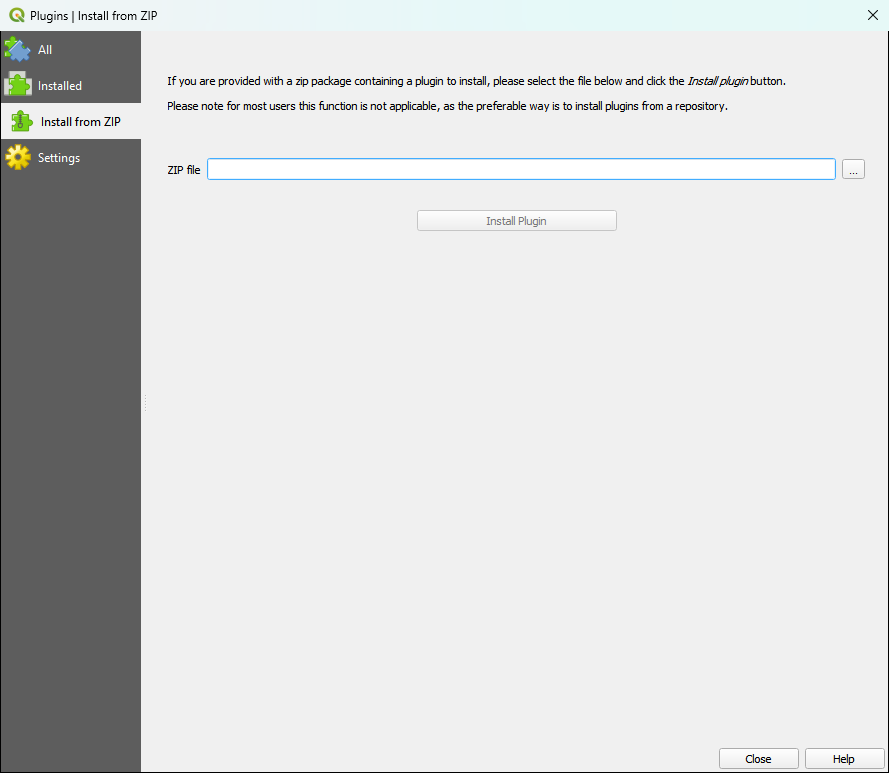
"Install from ZIP" tab of the QGIS plugin manager.
Security notice#
QGIS will display a notice indicating that the plugin does not come from the official repository. This is normal for any local file installation. Press Yes to continue with the installation.
Notes#
- If you already have a previous version of QGISRed installed, installing from ZIP replaces it. Existing projects are not affected.
- dependencies are not included in the plugin ZIP. They are downloaded separately the first time you use the plugin, just like installing from the repository. If your computer does not have an internet connection, see section Dependency management to see how to install them manually.
- This installation does not receive automatic updates. To update, you will have to repeat the process with the ZIP of the new version.